One of the most common questions aspiring creators ask is how much does it cost to start a YouTube channel. The answer ranges from literally $0 - using nothing but a smartphone you already own - to $5,000 or more for a professional-grade setup with a dedicated camera, studio lighting, premium audio, and paid editing software. The right investment depends on your content type, your current resources, and how seriously you plan to pursue YouTube as a creative and business endeavor.
Here is the encouraging truth: the barrier to entry has never been lower. YouTube is completely free to use, modern smartphones shoot video quality that would have required a $3,000 camera ten years ago, and free editing software exists that is powerful enough for professional work. Some of the most successful YouTubers in history - PewDiePie, Emma Chamberlain, David Dobrik - started with basic equipment and upgraded as their channels grew and generated revenue.
In 2026, the creator economy is more accessible than ever. AI-powered editing tools have made post-production faster, camera manufacturers are designing products specifically for content creators, and competition among equipment makers has driven prices down while pushing quality up. A $900 camera today outperforms a $3,000 camera from 2018 in autofocus accuracy, low-light performance, and video feature sets.
This guide breaks down how much it costs to start a YouTube channel at four distinct budget levels, with specific product recommendations and current 2026 pricing. By the end, you will know exactly what to buy (and what to skip) at your budget level.
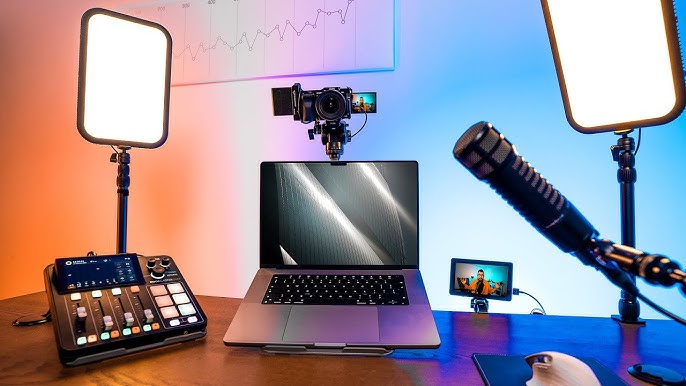
Image: Vidpros
The $0 Setup: Starting With What You Have
If your question is how much does it cost to start a YouTube channel at the absolute minimum, the answer is zero dollars - assuming you already own a smartphone made in the last five years. Here is what a $0 setup looks like and why it is more viable than most people think.
Camera: Your smartphone. An iPhone 14 or newer, Samsung Galaxy S22 or newer, or Google Pixel 7 or newer all shoot 4K video with image stabilization and capable low-light performance. Many successful YouTube videos are filmed entirely on smartphones. The key is shooting in well-lit conditions (natural window light is your best friend) and holding the phone steady or propping it on a stack of books. The iPhone 16 Pro shoots 4K at 120fps with a dedicated camera button, and even mid-range phones from Samsung and Google deliver excellent video quality in 2026.
Audio: Your phone’s built-in microphone. Phone microphones have improved dramatically, and in a quiet room at close range (within 2-3 feet), they produce usable audio. Film in the quietest room in your home, close windows, turn off fans and air conditioning, and speak clearly toward the phone. The audio will not be studio quality, but it will be adequate for your first videos while you build an audience.
Lighting: Natural light. Position yourself facing a window during daylight hours. Natural window light is soft, flattering, and free. It is genuinely better than cheap artificial lighting for most purposes. Avoid having the window behind you (which creates a silhouette effect) and avoid direct harsh sunlight (which creates hard shadows on your face).
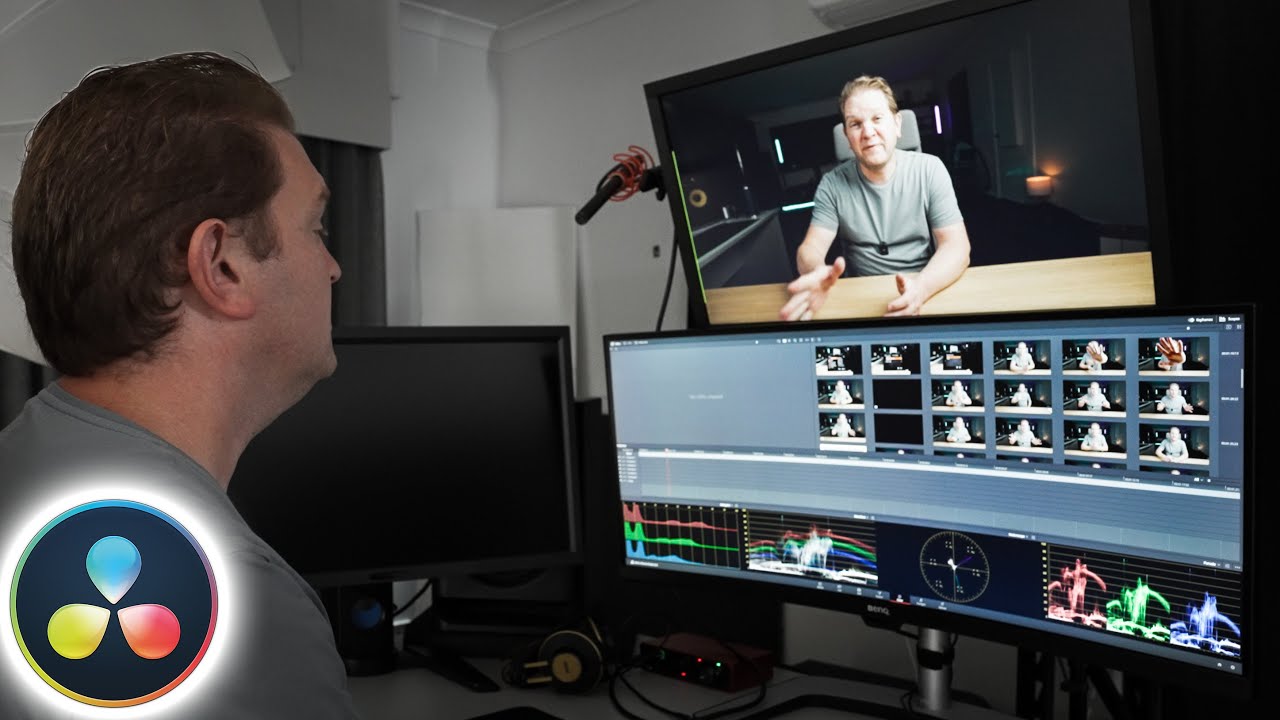
Editing: Free software. DaVinci Resolve (free version is remarkably powerful - used by professional filmmakers), iMovie (free on Mac and iOS), CapCut (free on all platforms with advanced features), and YouTube’s built-in editor handle basic cuts, transitions, text overlays, and music. CapCut has become particularly popular among YouTubers for its ease of use, AI-powered features, and surprisingly advanced editing capabilities at zero cost.
Total cost: $0. This setup will not win any production awards, but it gets you creating and publishing immediately. The content, personality, and consistency of your uploads matter far more than production quality when you are starting out. Do not let equipment be the excuse that stops you from publishing your first video.
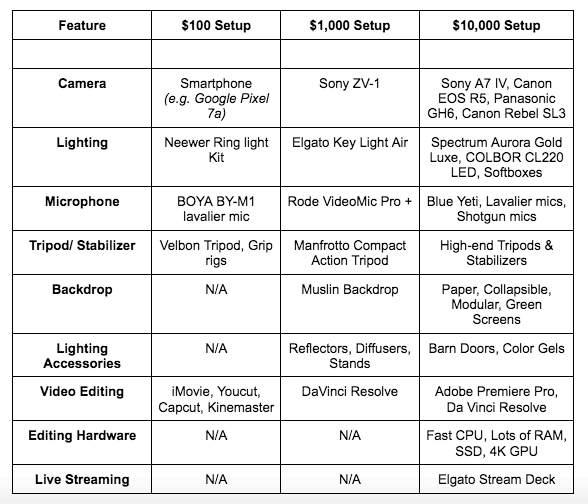
Budget Setup: $100 to $500
A small investment of $100 to $500 addresses the biggest limitations of the $0 setup - audio quality, stability, and lighting - and makes your videos look and sound notably more professional.
Smartphone tripod ($15 to $30): A basic tripod with a phone mount eliminates shaky footage and frees up your hands. The Joby GorillaPod ($30) is popular for its flexibility - it stands on desks, wraps around objects, and adjusts to any angle. A standard desk tripod with a phone clamp costs as little as $15 and solves the stability problem immediately.
External microphone ($30 to $100): This is the single most impactful upgrade when figuring out how much it costs to start a YouTube channel that sounds professional. Audio quality affects viewer retention more than video quality - viewers will tolerate a slightly grainy image but will click away from bad audio within seconds. Options: Boya BY-M1 lavalier ($20) - clips to your shirt and plugs into your phone for immediate audio improvement. Rode VideoMicro II ($79) - a compact on-camera shotgun mic that works with phones and cameras. Fifine K669B USB mic ($30) - a desktop USB microphone for talking-head videos recorded on a computer.
Ring light or LED panel ($20 to $60): A 10-inch ring light ($20 to $30) provides even, flattering facial illumination for talking-head videos. A small LED panel like the Neewer 660 ($45 to $60) offers more versatile positioning and adjustable color temperature. Either option dramatically improves video quality in rooms with poor natural lighting and gives your videos a polished, intentional look.
Simple backdrop ($15 to $40): A clean background eliminates visual distractions. A solid-colored fabric backdrop ($15) or a collapsible backdrop with stand ($40) creates a professional look. Alternatively, organize a section of your room with clean shelves, plants, or simple decor as a dedicated filming corner - many top YouTubers use a styled room background rather than a backdrop.
Total: approximately $100 to $250 for a significant quality upgrade.
Mid-Range Setup: $500 to $2,000
The $500 to $2,000 range is where your YouTube channel starts looking and sounding like the channels you watch and admire. This is the budget where a dedicated camera, quality audio, and proper lighting come together into a cohesive production setup.
Camera ($400 to $1,000): At this budget, you have excellent camera options in 2026. Sony ZV-E10 II ($998) - the popular successor to the original ZV-E10, designed specifically for content creators with interchangeable lenses, a flip-out screen, excellent autofocus, and significantly improved video quality over its predecessor. Canon EOS R10 ($979 with kit lens) - an interchangeable-lens camera with Canon’s outstanding Dual Pixel autofocus and 4K video capability. For a more compact option, the Canon PowerShot V10 ($430) is a pocket-sized vlog camera with a built-in wide-angle lens and flip screen.
Audio ($80 to $300): Rode NT-USB Mini ($99) - a studio-quality USB microphone for desk recordings that punches well above its price point. Rode Wireless Go II ($300) - a wireless lavalier system with two transmitters that gives you freedom of movement while maintaining professional audio, ideal for vloggers and mobile shooting. Shure MV7+ ($279) - a premium USB/XLR hybrid dynamic microphone with built-in DSP processing, auto level mode, and a digital pop filter that handles everything from podcasting to music vocals.
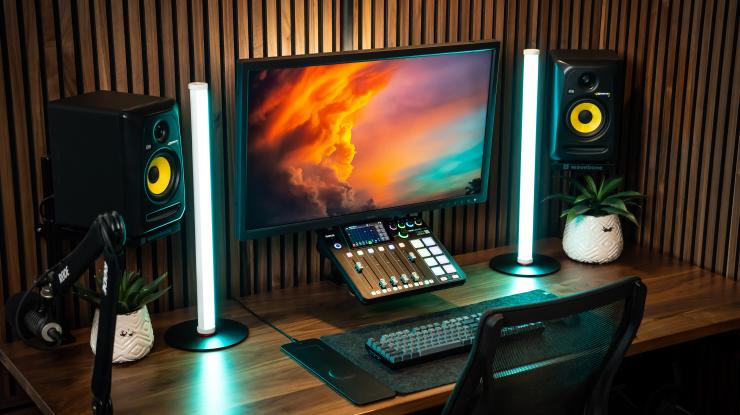
Lighting ($100 to $400): A two-light or three-light kit provides professional-level illumination. Elgato Key Light ($200) - designed for content creators, mounts on a desk clamp, and is controlled via Wi-Fi app with 2,800 lumens of flicker-free output. Neewer 2-Pack LED Panel Kit ($100 to $120) - two adjustable LED panels with stands for flexible two-point lighting. Aputure Amaran 100D ($175) - a professional-grade LED with excellent color accuracy that scales into any setup.
Editing software ($0 to $300): DaVinci Resolve (free) remains the recommendation at every budget level in 2026 - it is genuinely professional-grade software used on Hollywood films. If you prefer alternatives, Final Cut Pro ($300 one-time, Mac only) or Adobe Premiere Pro ($23/month) are industry standards. CapCut Pro has also emerged as a capable option for creators who want speed and simplicity.
Accessories ($50 to $200): Quality tripod ($50 to $100), memory cards ($30 to $60), camera bag ($30 to $50), and a USB-C capture card for webcam use ($20 to $50).
Total: approximately $900 to $2,000 for a complete mid-range creator setup.
Image: Cute Tech Gadgets
Professional Setup: $2,000 to $5,000+
At the professional level, understanding how much it costs to start a YouTube channel means investing in equipment that delivers broadcast-quality results and can grow with your channel for years without needing replacement.
Camera ($1,000 to $2,500): Sony A6700 ($1,400 body) - exceptional AI-based autofocus, 4K 120fps, outstanding low-light performance, and in-body image stabilization. Canon EOS R6 Mark II ($1,598 body) - widely considered the gold standard for video autofocus with 4K 60fps and 6K oversampled video quality that produces incredibly clean 4K output. Sony A7C II ($2,198 body) - full-frame sensor for cinematic depth of field and incredible image quality in a remarkably compact body. Panasonic Lumix GH6 ($1,697 body) - outstanding video features including 4K 120fps and ProRes recording for professional post-production workflows.
Lenses ($200 to $1,000): A fast prime lens creates the blurred background “cinematic look” that distinguishes professional-looking YouTube content. The Sigma 16mm f/1.4 ($369) is the most popular wide-angle option for APS-C cameras, perfect for talking-head videos with a natural perspective. The Sony 35mm f/1.8 ($748) is excellent for full-frame cameras. A good lens often improves image quality more than upgrading the camera body - prioritize glass if your budget is limited.
Audio ($100 to $600): Shure MV7+ ($279) - a premium USB/XLR dynamic microphone with excellent sound, auto level mode, and a built-in digital pop filter. Rode PodMic USB ($99) - a broadcast-quality dynamic mic at a remarkable price that connects via USB-C. For the top tier: Shure SM7dB ($549) - the modern evolution of the legendary SM7B with a built-in active preamp that eliminates the need for external gain boosters. Electro-Voice RE20 ($449) - the broadcast industry standard microphone heard on radio stations worldwide.
Professional lighting ($400 to $1,000): Three-point lighting setup with Aputure Amaran 200D ($249) as key light, two Aputure Amaran 100D ($175 each) as fill and hair light, plus light modifiers (softboxes, diffusion panels). This provides studio-quality lighting with adjustable power, color temperature, and creative effects. The Aputure ecosystem is particularly strong in 2026 because all lights use the same Sidus Link app for wireless control.
Audio interface (if using XLR microphone): $100 to $300. Focusrite Scarlett Solo 4th Gen ($130) or Focusrite Scarlett 2i2 4th Gen ($180) for single or dual-microphone setups. The TC Helicon GoXLR Mini ($179) adds built-in mixer controls and audio routing that streamers find particularly useful.
Total: approximately $3,000 to $5,500+ for a professional YouTube studio.
Camera Options at Every Budget
Camera choice generates the most debate among YouTube creators, but the reality is that your camera matters less than you think. Audio, lighting, and content quality have a bigger impact on viewer retention than whether you shoot on a $400 or $2,000 camera. That said, here is what each tier gets you in 2026.
Ad SpaceIn-Article - 300x250
Advertisement
The smartphone tier ($0): iPhone 16 Pro, Samsung Galaxy S25 Ultra, Google Pixel 9 Pro. These phones shoot 4K at 60fps or higher, have excellent stabilization, and some shoot in log profiles for color grading flexibility. For vlog-style, talking-head, and screen-recorded content, a modern flagship smartphone is genuinely sufficient and often more convenient than a dedicated camera. The computational photography in 2026 smartphones can produce results that surprise even professional videographers.
The compact/vlog camera tier ($350 to $600): Canon PowerShot V10 ($430), Sony ZV-1F ($500). Purpose-built for content creation with flip-out screens, auto-framing features, and built-in microphones that are significantly better than typical camera microphones. These cameras live in your pocket and are always ready to shoot, making them ideal for vloggers and creators who film outside the studio.
The interchangeable lens tier ($800 to $1,500): Sony ZV-E10 II ($998), Canon EOS R10 ($979), Fujifilm X-S20 ($1,299). These provide dramatically better image quality through larger sensors and the ability to use different lenses for different shooting scenarios. The Sony ZV-E10 II has become the default recommendation for serious YouTube creators in 2026, offering creator-focused features like a product showcase mode, background defocus button, and outstanding autofocus in a lightweight body.
The full-frame tier ($1,400 to $2,500): Sony A6700 ($1,400 - technically APS-C but with pro-level features), Sony A7C II ($2,198), Canon R6 Mark II ($1,598). Full-frame and high-end APS-C sensors provide the best low-light performance, shallowest depth of field, and most cinematic image quality. This is the ceiling for most YouTube creators - anything beyond this is for narrative filmmaking or broadcast production.
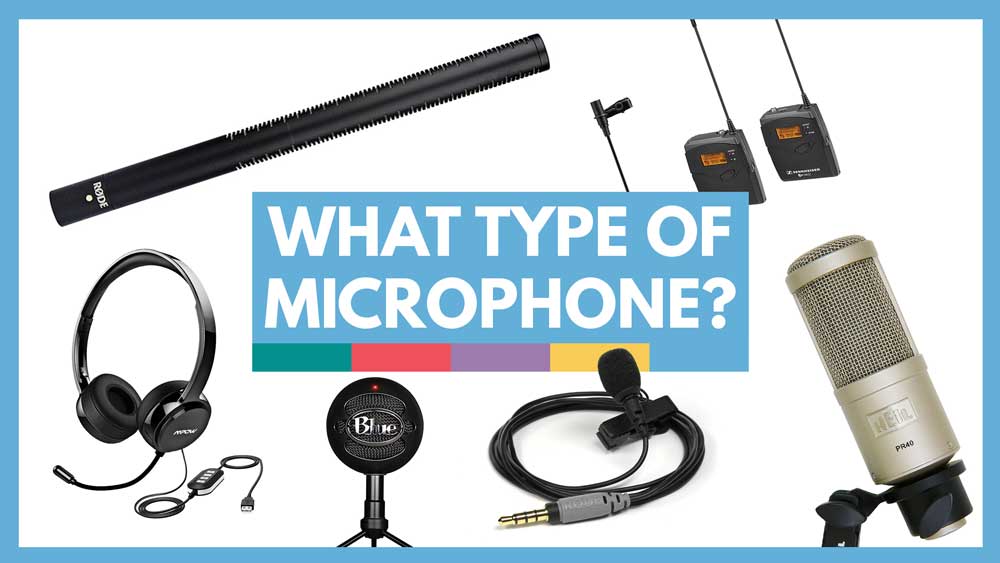
Audio Equipment Breakdown
Audio deserves special emphasis in any analysis of how much it costs to start a YouTube channel because poor audio is the number one reason viewers click away from videos. You can get away with mediocre video quality, but you cannot get away with bad audio. Invest in sound first.
Budget USB microphones ($30 to $70): Fifine K669B ($30), Samson Q2U ($70), Maono AU-PM421 ($45). These plug directly into your computer via USB and provide a massive upgrade over built-in laptop or webcam microphones. The Samson Q2U is particularly versatile because it has both USB and XLR connections, so it grows with you if you later add an audio interface.
Mid-range USB microphones ($80 to $200): Rode NT-USB Mini ($99), Elgato Wave:3 ($150), HyperX QuadCast S ($160). These offer studio-quality sound, adjustable gain, and often include software for real-time audio processing. The Rode NT-USB Mini delivers exceptional clarity for its size and price, while the Elgato Wave:3 integrates with the broader Elgato creator ecosystem for streamers.
Professional microphones ($200 to $550): Shure MV7+ ($279), Shure SM7dB ($549), Rode PodMic USB ($99), Electro-Voice RE20 ($449). These are the microphones you see on the desks of major YouTubers and podcasters. The Shure MV7+ is the sweet spot for most creators - it sounds excellent, works over both USB-C and XLR, and includes DSP features like auto level mode and a digital pop filter. The SM7dB is the premium choice - it is essentially the legendary SM7B with a built-in active preamp that solves the gain issues that plagued the original.
Wireless options ($200 to $300): DJI Mic 2 ($299) and Rode Wireless Go II ($300) are the top wireless systems for YouTube creators who need mobility. The DJI Mic 2 features built-in noise cancellation and internal recording as a safety backup, making it the stronger choice for outdoor shooting. The Rode Wireless Go II offers excellent reliability and integrates with Rode’s software ecosystem. Both systems include two transmitters for dual-person interviews.
Image: Video School
Lighting for YouTube Videos
Lighting transforms video quality more than any other factor except audio. A $400 camera in great lighting produces better-looking footage than a $2,000 camera in bad lighting. This is not an opinion - it is physics. Light determines how your camera sensor performs, how your skin looks on screen, and how professional your videos feel.
Free: Natural window light. Position yourself facing a large window during daylight hours. This is genuinely beautiful, soft lighting that flatters every skin tone. The limitation is that it is only available during certain hours and changes throughout the day, which can create inconsistency between shots if you film over long sessions.
Budget ($20 to $60): A 10-inch ring light ($20 to $30) is the most popular entry-level lighting for YouTube. It provides even illumination, reduces shadows, and creates an attractive catch light in your eyes. Larger 18-inch ring lights ($40 to $60) offer more light output and adjustable color temperature. Ring lights have a distinct look - flat, even, slightly glamorous - that works well for beauty, talking-head, and tutorial content.
Mid-range ($80 to $250): LED panel lights like the Elgato Key Light Mini ($79) or Neewer 2-Pack panels ($100 to $120) provide more natural-looking illumination than ring lights. Two-point lighting (one main light, one fill light) eliminates the flat “ring light look” and adds dimension and depth to your face. The Elgato Key Light ($200) remains the top choice for desk-mounted content creation - its 2,800 lumens, Wi-Fi control, and flicker-free output justify the premium price for serious creators.
Professional ($300 to $1,000): Three-point lighting with quality fixtures - key light (main illumination), fill light (softens shadows), and hair light (separates you from the background). Brands like Aputure, Nanlite, and Godox offer professional LED fixtures from $100 to $500 each that provide studio-quality results with excellent color accuracy. The Aputure Amaran series offers the best combination of quality and value for YouTube creators stepping into professional lighting.
Editing Software Costs
The editing software landscape in 2026 is remarkably generous, with free options that genuinely compete with paid professional tools.
Free options: DaVinci Resolve (the most powerful free video editor available - used by professional Hollywood colorists and editors), iMovie (Mac/iOS - intuitive and beginner-friendly), CapCut (all platforms - fast, modern, excellent AI-powered features for short-form and long-form content), and Shotcut (open-source, cross-platform). DaVinci Resolve deserves special attention because its free version includes professional color grading, Fairlight audio post-production, and visual effects tools that competitors charge hundreds of dollars for.
Paid options: Final Cut Pro ($300 one-time, Mac only - fast rendering, excellent for Apple ecosystem users, also available as a $13/month subscription), Adobe Premiere Pro ($23/month - industry standard with deep integration with After Effects and Photoshop), Filmora ($50/year - beginner-friendly with good effects library and a gentler learning curve than professional editors).
Our recommendation: Start with DaVinci Resolve regardless of budget. It is professional-grade software that is completely free for features that 99% of YouTubers need. The learning curve is steeper than CapCut or iMovie, but the skills you develop transfer directly to professional editing work. Upgrade to a paid option only if you identify a specific feature or workflow limitation that DaVinci Resolve does not address - most creators never reach that point.
Ongoing Monthly and Annual Costs
Beyond initial equipment, understanding how much it costs to start a YouTube channel means accounting for recurring expenses that sustain your production quality and channel growth.
Music licensing ($0 to $17/month): Epidemic Sound ($15/month) provides over 40,000 tracks pre-cleared for YouTube Content ID - meaning no copyright claims on your videos. Artlist ($17/month billed annually at $199/year) provides royalty-free music with broader commercial usage rights. YouTube’s Audio Library offers free music and sound effects. Using copyrighted music without a license results in Content ID claims that divert your video’s ad revenue to the music rights holder or get your video muted entirely.
Thumbnail design ($0 to $13/month): Canva Pro ($13/month) is the most popular tool for creating YouTube thumbnails with access to premium templates, stock photos, and the background remover tool. The free version works but limits template and asset access. Adobe Photoshop ($23/month as part of the Photography plan) is the professional alternative used by top creators for custom thumbnail designs.
Channel optimization tools ($0 to $40/month): TubeBuddy (free tier available, Pro plan at $10/month, Legend plan at $27/month) and vidIQ (free tier, paid plans starting at $8/month up to $79/month for Max) provide keyword research, SEO tools, A/B thumbnail testing, and competitor analysis. These tools help you optimize titles, descriptions, and tags to improve discoverability. For new channels, the free tiers of either tool provide enough functionality to get started.
Storage and backup ($3 to $10/month): Video files are large - a single 4K project can easily reach 50GB or more. An external hard drive ($60 to $120 one-time for 2TB) or cloud storage (Google One at $3/month for 200GB, Backblaze at $9/month for unlimited) keeps your content safe. Always maintain at least one backup of finished videos and project files.
Internet costs: If you are uploading 4K videos regularly, you need at least 10 Mbps upload speed, and 25 Mbps or higher makes the process significantly less painful. Most home internet plans in 2026 support this, but if yours does not, upgrading may be necessary ($10 to $30/month more).
Total ongoing costs: $0 to $60 per month for a well-equipped creator.
Image: YouTube
Key Takeaways
You can start a YouTube channel for $0 using your smartphone, natural window light, and free editing software like DaVinci Resolve or CapCut - content quality and consistency matter far more than equipment when starting out.
The highest-impact first purchase is an external microphone ($30 to $100) because audio quality affects viewer retention more than video quality - the Rode NT-USB Mini ($99) or even the Fifine K669B ($30) make an immediate difference.
A solid mid-range setup ($900 to $2,000) with a dedicated camera like the Sony ZV-E10 II ($998), quality microphone, and proper lighting produces content that competes with established channels.
DaVinci Resolve is free, professional-grade editing software that eliminates the need for expensive paid editors - start here regardless of your budget.
Ongoing monthly costs (music licensing, thumbnail tools, storage) add $0 to $60/month depending on which services you use - many successful creators keep recurring costs under $30 by using free alternatives strategically.
Frequently Asked Questions
Can I really start a successful YouTube channel with just my phone?
Yes. Many channels with millions of subscribers were built primarily with smartphone footage. Casey Neistat, one of YouTube’s most influential creators, frequently shot on iPhones. The key factors for success are content quality, niche selection, consistency, and storytelling - not camera specifications. Modern smartphones like the iPhone 16 Pro, Samsung Galaxy S25 Ultra, and Google Pixel 9 Pro shoot 4K video with stabilization and computational photography that rivals dedicated cameras in many conditions. Start with your phone, focus on making content people want to watch, and upgrade equipment as your channel generates revenue.
What is the most important piece of equipment to buy first?
An external microphone. Audio quality is the single biggest differentiator between amateur and professional-feeling YouTube videos. Viewers will tolerate mediocre video quality but will click away from poor audio within seconds. A $30 lavalier microphone like the Boya BY-M1 or a $99 USB desk microphone like the Rode NT-USB Mini provides an immediate and dramatic improvement over built-in phone or laptop microphones. This single purchase has more impact on perceived production quality than any other upgrade you can make.
How much does it cost to start a YouTube channel if I want to do screen recordings?
Screen recording channels (tutorials, software reviews, gaming) have the lowest equipment costs because you do not need a camera or lighting at all. A quality USB microphone ($60 to $150), free screen recording software (OBS Studio), and free video editing software (DaVinci Resolve) is the complete setup. Total cost: $60 to $150 plus equipment you likely already have (computer and internet). If you want to add a facecam overlay, your phone or laptop webcam works fine for the small picture-in-picture window most screen recording creators use.
Should I buy all my equipment at once or build up gradually?
Build gradually. Start with what you have, publish your first videos, and then invest in upgrades that address specific limitations you encounter. If your audio sounds bad, buy a microphone. If your videos look dark, buy a light. If your phone cannot shoot the quality you need, buy a camera. This approach ensures every purchase solves a real problem rather than being a speculative investment in equipment you might not need. It also prevents the common trap of spending weeks researching gear instead of actually creating content.
Are there any recurring costs for running a YouTube channel?
YouTube itself is free to use with no ongoing platform fees. Optional recurring costs include music licensing services like Epidemic Sound ($15/month) or Artlist ($17/month), design tools like Canva Pro ($13/month), SEO tools like TubeBuddy or vidIQ ($8 to $27/month), cloud storage ($3 to $10/month), and editing software subscriptions if you choose paid options like Premiere Pro ($23/month). Many successful creators keep recurring costs under $30 to $50 per month by using free alternatives wherever possible - DaVinci Resolve for editing, YouTube’s free Audio Library for music, and Canva’s free tier for thumbnails.
Ad SpaceIn-Article - 300x250
Advertisement
Share
Get the recap
Loved this story? Get more like it.
Join readers who get our weekly entertainment recap - the stories worth your time, delivered every Friday.
No spam. Unsubscribe anytime. By signing up you agree to our Privacy Policy.